Change App Language
- To change the app language, copy and paste the file
lib/app/translations/en_US.dart. - Rename the new file based on your language/country code (example: Italian
it_IT.dart).- The first part is lowercase language code.
- Then underscore.
- Then uppercase country code.
- Reference: https://docs.oracle.com/cd/E13214_01/wli/docs92/xref/xqisocodes.html
- Translate the values in the file, example:
'Hallo': 'Hallo'→'Hallo': 'Hola'
- Don’t forget to change the variable name to your country code.

- Open
lib/app/utils/localization.dartand import your new translation file.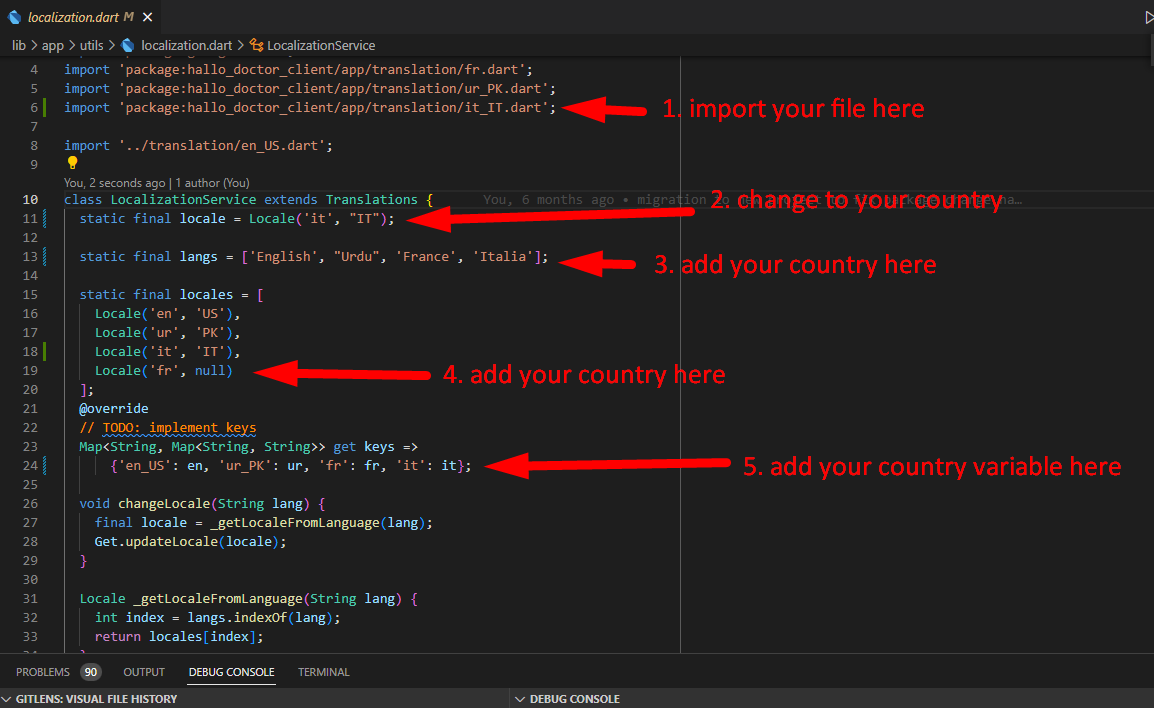
- Run the app.
info
If you want to add new text in the app, make sure you add .tr after the string, example: "Hallo".tr. Then add the corresponding entry in your translation file.